If you have ever watched a speaker walk up a minute early while the microphones were still muted, you already know why event programming matters. The programme booklet tells guests what is meant to happen. The run-of-show tells the people running the room — you, the AV crew, the livestream operator — what happens next, who cues it, and what to do if the timing slips.
This guide is for event coordinators and organisers in Singapore: the person in the earpiece, the colleague with the printed sheet, the comms lead keeping a conference, town hall or award ceremony on track. You do not need to be a technician to write a good run-of-show. You do need a document that the coordinator and the AV team can share.
What a run-of-show is (and what it is not)
A run-of-show is a working cue sheet, usually in time order. It is not the guest programme, and it is not a quotation. It is the shared plan for the day: when doors open, when the livestream goes live, when a speaker is invited to the lectern, when walk-on music starts, and when the hall is stood down.
Write it so that someone joining mid-morning can still follow it. Short rows, clear times, and a named person for each cue work better than a long narrative.
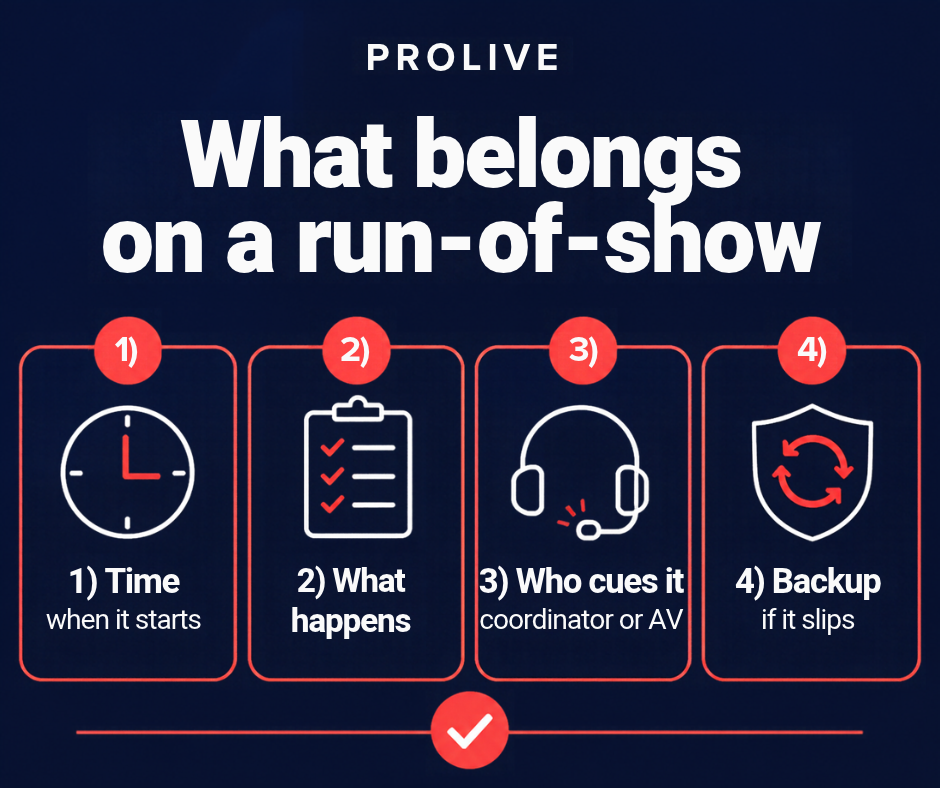
What belongs on a run-of-show: the time, what happens, who cues it, and a backup if the slot slips.
Four things every cue should carry
You can format the sheet in Excel, a printed table, or a shared document. The format matters less than the four pieces of information on each line:
- Time — when the cue starts, in one timezone. Note whether it is “not earlier than” or “must start at”.
- What happens — one clear action: “Doors”, “First speaker to lectern”, “Q&A starts”, “Stream ends”.
- Who cues it — the coordinator, the audio desk, the display operator, or the livestream operator. If two people must move together, say so.
- Backup — what happens if a speaker is late, a video will not play, or a segment overruns. It can be as simple as “hold walk-in music” or “skip the guest video and go to the next speaker”.
If you are running display services — venue projectors, floor monitors, a confidence monitor, a long-range clicker — the run-of-show should also say what is on each screen at key moments. The main screen, the speaker’s floor monitor and an overflow feed do not always show the same picture.
How the AV team uses your document
A good run-of-show works because everyone is looking at the same clock. At PROLIVE, the desk that mixes event audio, switches cameras and runs the livestream works from the same cues you do. Write those cues in language the crew can act on:
- “Mic 2 live as she reaches the lectern,” not “speaker starts”.
- “Walk-in music under, fade at the thank-you,” not “music as needed”.
- “Slides on the main screen; floor monitor shows the countdown,” not “screens ready”.
- “Livestream goes live at 09:55, holding a wide shot until 10:00,” not “stream starts around the opening”.
If the event will have name supers or other on-screen graphics, say so early. Graphics and lower thirds are a paid extra: they take time to build, and they often need a separate machine. They belong in the run-of-show as their own cues — who is on, how the name is spelled, and when the graphic comes out — not as a last-minute WhatsApp.
Share a draft before the recce, if you can, and a locked version the day before. For a venue PROLIVE has not covered before, a recce is how we check display connections and the route from the loading bay. Your run-of-show gives that visit a purpose: we can walk the room in the order the day will actually run.
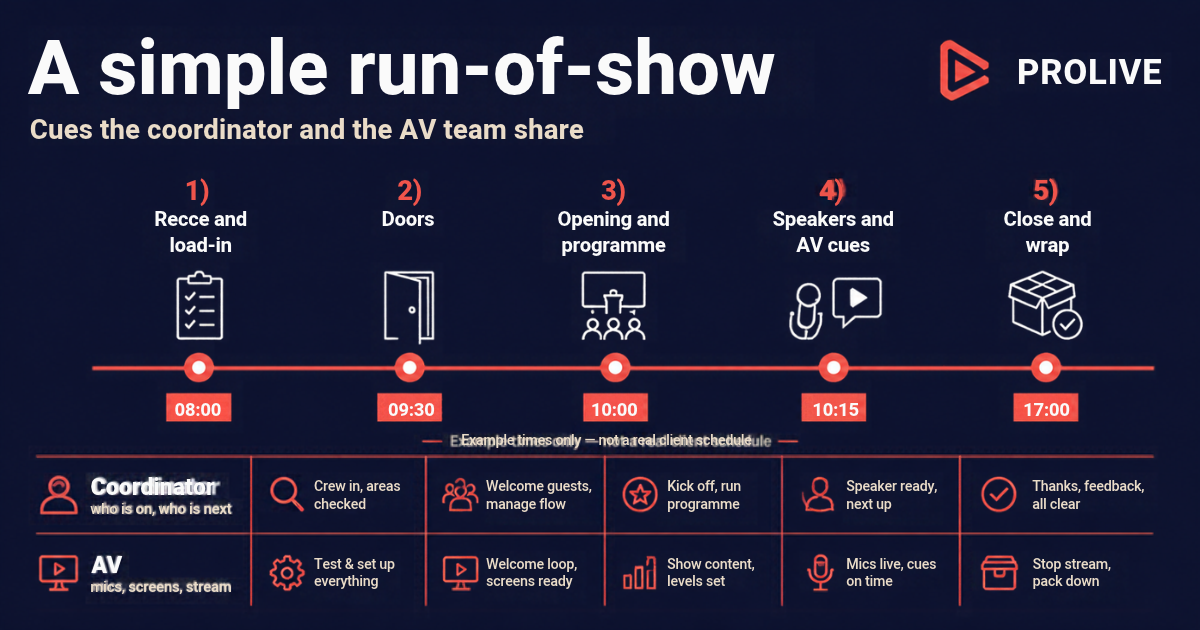
A simple run-of-show, from recce and load-in to close and wrap. The times on this graphic are examples only, not a real event schedule.
A practical checklist
- One run-of-show, shared with the coordinator and the AV team, with a version number and a “last updated” time.
- Doors, programme start, and stand-down times that match what guests have been told.
- A named cue for livestream start and stop, if you are streaming, including the platform.
- Microphone and screen changes written in, including when a handheld, lectern mic and lapel have to follow one another.
- Speaker names spelled as they should appear on a graphic or a confidence monitor.
- A short backup for the three things most likely to slip: a late speaker, a file that will not play, and a segment that runs long.
- A clear end: thank-yous, the last slide, the stream off, and who is still in the hall.
Frequently asked questions
How detailed does the run-of-show need to be?
Detailed enough that two teams can run the same minute without a side conversation. A straightforward briefing may need a single page; a conference with many speakers may need a longer table. If a line does not tell someone what to do, it can usually come out.
When should I send it to the AV crew?
A working draft is useful as soon as the programme is reasonably firm, and essential before a recce. A final version the afternoon before is much more helpful than a new file on the morning of the event. Flag late changes in one place, rather than across several chats.
Do I still need a run-of-show if we are not livestreaming?
Yes. Audio, displays and speaker cues still have to move together, whether or not there is a stream. If you later add a livestream or a hybrid speaker, the same sheet is the base you build on.
What if the guest programme changes on the day?
It will, at least a little. Keep one person as the “clock” — usually the coordinator — and agree in advance who may change the order. The backup column is there so the desk can follow you without stopping the show to rewrite the sheet.
A clear run-of-show will not make an event rigid. It makes it easier to be flexible, because everyone can see where you are and where you are going next.
Not sure which service you need? WhatsApp us and we’ll help you work it out.
WhatsApp: +65 9452 0491