A single camera at the back of the hall can record that an event took place. It rarely tells the story well. The wide shot is too far from the speaker’s face, and a tight shot of the lectern misses a question from the floor or the moment a recipient walks up to collect an award. For a conference, an AGM or an award ceremony, the programme usually needs more than one view, cut together as one clear picture.
That is what PROLIVE’s multi-camera production is for. Several cameras cover the stage and the room. A vision mixer switches between them as the programme unfolds, so the people in the hall, and anyone watching a livestream, see the right shot.
When one camera is not enough
At a conference, the picture has to move with the programme: a wide view as the session opens, a closer shot of each speaker, the slides when they matter, and the panel when several people are talking.
At an AGM, the formal moments are often at a podium or a table, but the useful record also includes the board or panel, a resolution on the screen, and members who are invited to speak. At an award ceremony, the walk to the stage is part of the story, as is the handshake, the citation, and the reaction in the room.
A smaller talk or interview may be well covered with two cameras. A conference, a school ceremony or an award programme often needs more — commonly four — so the operator can cut between a wide shot, the speaker, and closer coverage of the stage. The number is planned around the venue and the rundown, not picked from a fixed list.
What each camera is for
The useful way to brief a crew is to say what each camera is meant to catch, rather than only how many will be in the room.
- A wide shot of the stage — who is on, how the set looks, and how the room sits around the programme.
- A speaker or lectern camera — a closer view of the person talking, so faces read clearly on a hall screen or a stream.
- Audience or floor coverage — questions, reactions, and the people the programme is for.
- A detail or walk-up camera — a second close view for an award walk, a panel, a demonstration, or a slide that needs to be readable.
Not every room uses all four in the same way. In a small seminar the third and fourth roles may be combined. In a large ceremony they may be distinct positions, agreed at the recce.
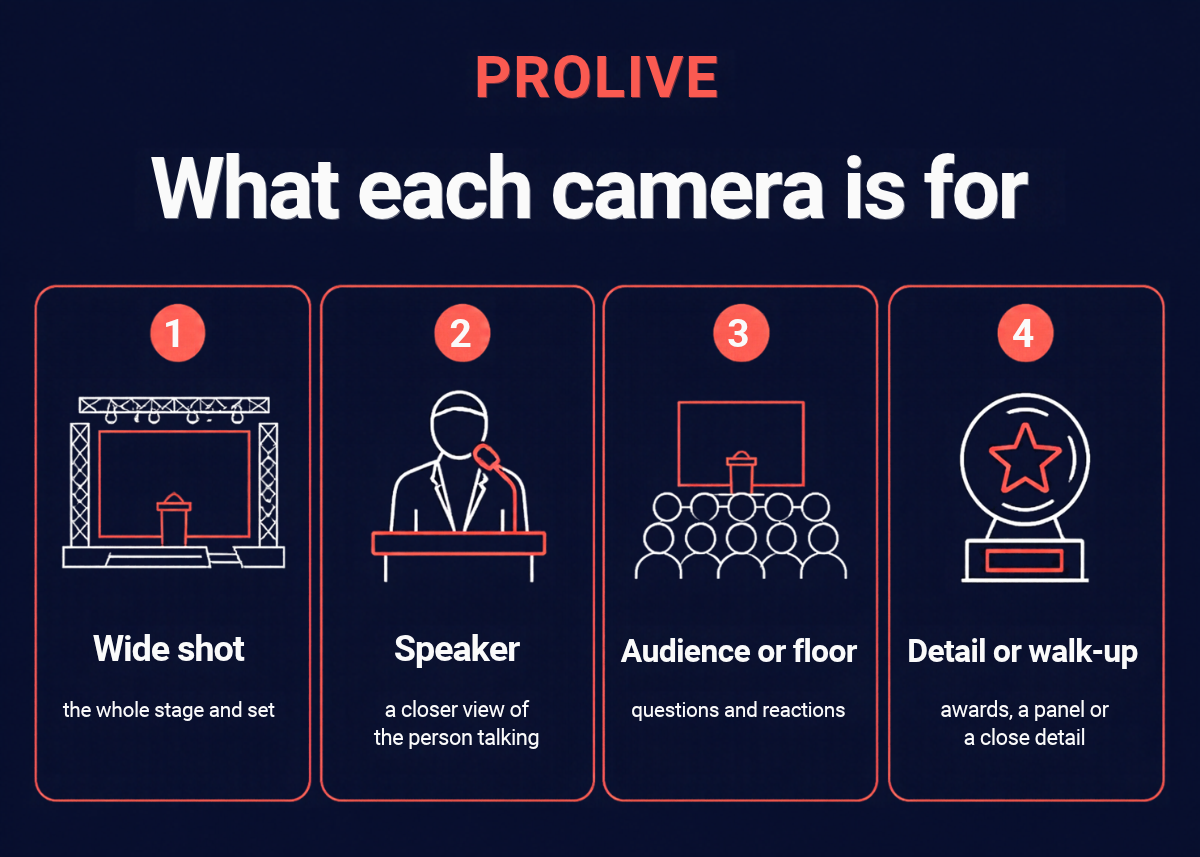
What each camera is for: a wide view of the stage, a closer shot of the speaker, coverage of the room, and a detail or walk-up camera when the programme needs it.
How the pictures become one programme
The cameras are only half of the work. A vision mixer — PROLIVE runs this in vMix — takes those pictures, plus the hall sound, and switches them in real time. The result is one programme, not four separate recordings that someone has to choose from later.
That programme can go to several places at once: the venue screens or projectors, a livestream to YouTube, Facebook, Zoom or a private link, and a recording of the day. A hybrid event, with a remote speaker on the hall screens, uses the same kind of switched programme, with their picture mixed in. The operator still chooses the shot, following the run-of-show you share with the crew.
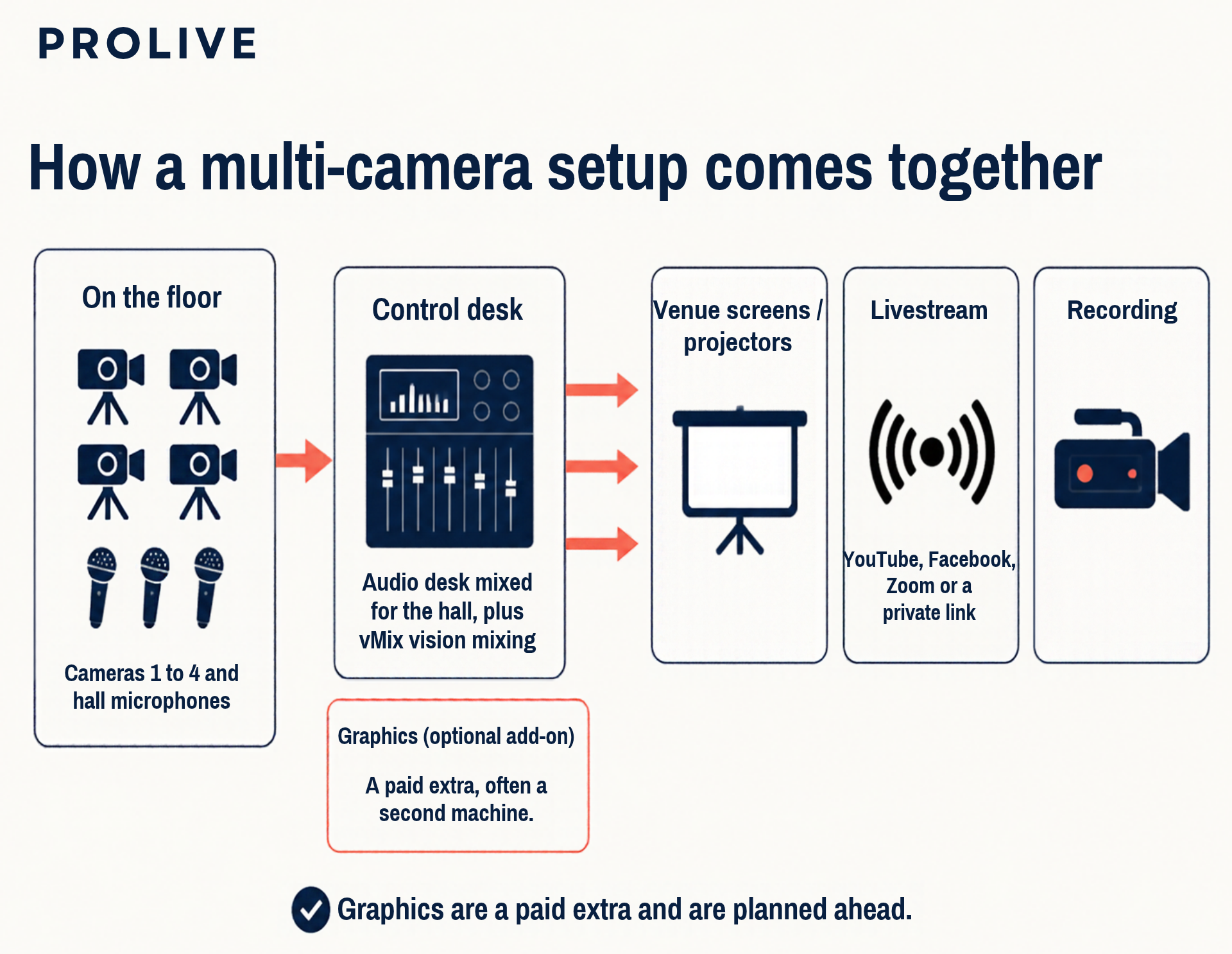
How a multi-camera setup comes together: cameras and sound are mixed into one programme, then sent to the hall screens, a livestream and a recording. Graphics are an optional add-on.
Graphics, screens and the livestream
Name supers, lower thirds and other on-screen graphics help viewers follow who is speaking. They are a paid extra. They take time to build to your programme, and they often need a separate machine to run them, so they are planned ahead. If you want them, send speaker names, titles and logos early.
The same switched programme can appear on the venue screens and on the livestream. That is often why organisers book livestreaming together with multi-camera coverage: people watching from elsewhere see the same clear picture as the front rows.
Planning the coverage
The smoothest days start with a clear rundown and, for a venue the crew has not covered before, a recce. The recce is there to check camera positions, the route from the loading bay, and — if you are streaming — the internet, with a backup ready. Share the date, venue, programme, and where you want the event to be seen: in the room, online, or both. Tell the team about a panel, an award walk, a demonstration, a floor question or a remote speaker. Those cues decide how many cameras you need.
A practical checklist
- Share a rundown or run-of-show that lists speakers, panels, awards and video cues.
- Say where the programme should be seen: hall screens, a livestream, a recording, or a mix of these.
- Flag moments that need a second angle, such as a walk-up, a floor question or a panel.
- If you want name supers or lower thirds, send names, titles and logos early — they are a paid extra and are built ahead of the day.
- For a new venue, leave time for a recce to check camera positions and cable routes.
Frequently asked questions
How many cameras will we need?
It depends on the venue and the programme. A smaller talk or interview can be covered with two cameras. A conference, AGM or award programme often needs more, so the operator can cut between a wide shot, the speaker, and closer coverage of the stage. We will recommend a setup once we know the rundown and the room.
Can you livestream and record at the same time?
Yes. The same switched programme can go to YouTube, Facebook, Zoom or a private link, and be recorded at the same time. A recording only, or a live picture only in the room, can be arranged as well.
Are name graphics and lower thirds included?
No. Graphics and lower thirds are a paid extra. They take time to build, and they often need a separate machine to run them. Tell us when you brief the event if you would like them.
Do you also look after the sound and the screens in the hall?
Yes. Multi-camera work is often booked with hall audio and with the venue’s projectors or other displays, so both audiences follow the same programme.
When the cameras are planned around the programme, the hall and the livestream simply see the event as it happens.
Not sure which service you need? WhatsApp us and we’ll help you work it out.
WhatsApp: +65 9452 0491